


Feedback Flock Teacher Observation Software. -Trio Wordmark 80 heightFeedback Flock Teacher Observation Software. -Trio Wordmark 80 heightFeedback Flock Teacher Observation Software. -Trio Wordmark 80 heightFeedback Flock Teacher Observation Software. -Trio Wordmark 80 height
  • Home
  • Pricing
  • Principal’s Tools
    • Teacher Observation Time Savings Calculator
    • Teacher Observation Cost Savings Calculator
  • Blog
  • Help Center
    • Getting Started Guide
    • Get Support
  • Contact
  • Login
0

$0.00

Start Free Trial
✕

Schedule Future Teacher Observations

Published by Feedback Flock Teaching Team
Categories
Tags

How to Schedule Future Observations

A School Admin Guide

You’ve completed your first observation, but with more teachers to visit and a busy schedule, finding time for the rest can feel overwhelming. Feedback Flock makes it easy to share the workload or schedule your Observations in advance. The School Admin role allows your administrative assistant to schedule observations for your team without being an Observer. They can keep your calendar organized while you focus on supporting your teachers.

Prerequisites: 

  • Your Observation Forms and Requirements should be done. This helps determine who is due for their next Observation.
  • Your Faculty should be added. Their ‘Years taught’ should be populated for rule purposes.
  • You should be Principal, District Admin or School Admin role. These roles have the permission to create or schedule Observations as needed.
Time Requirements:  Set aside 5 minutes to learn scheduling..

Prioritize Observation Deadlines

Locate the Scheduling Icon on Overdue Observations from the Dashboard

After logging in and landing on the Dashboard, the Observation recommendations section shows Observations due this month based on any required rules set. Start here to see if there are any Observations that need to be prioritized. For users who have an Observation due, you can click the ‘calendar icon’ next to their ‘Start Observation’ and proceed to ‘Start Scheduling’ step 3 below.

Sort & Filter

Next, jump over to the People tab where we can choose between sorting by the ‘Last Observation’ column or utilizing the ‘Filters’ to choose a timespan since a teachers last Observation. For scheduling Observations, useful filters include ‘Never Observed’, ’90+ Days Ago’, etc.

After sorting by your appropriate needs, you should be presented with a list of your district or school faculty due for their next Observation.

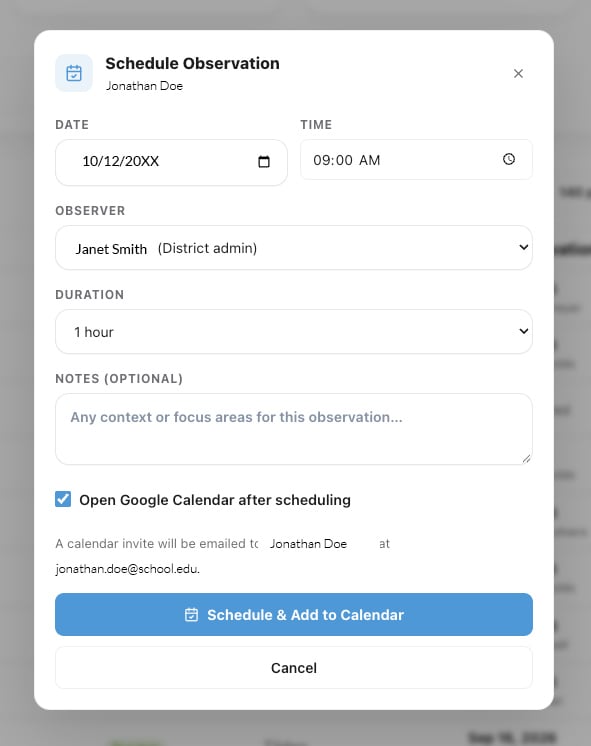
Schedule Teacher Observation Pop-up Form

Start Scheduling

To schedule their Observation:

  1. Hover your mouse over the date listed in their ‘Next Observation’ column and watch as the text now says ‘Schedule’.
  2. Click ‘Schedule’ and a ‘Schedule Observation’ popup will appear.
  3. Complete the date and time fields.
  4. Then select the ‘Observer’ from the available options.
  5. Define a duration for the appropriate Observation needed.
  6. Add any helpful notes to display for the Teacher and Observer.
  7. To push the event to Google Calendar, check the box next to ‘Open Google Calendar after scheduling’.
  8. Click ‘Schedule & Add to Calendar’.
  9. The teacher will automatically be added to the event.
  10. Assuming the Observer prefers to use their Google Calendar over the Feedback Flock Dashboard calendar view, we suggest adding the Observer as a guest on the calendar event as well.
  11. Click ‘Save’ and the event should populate to the Guests and Organizer’s Google Calendar.
  12. Close the calendar browser tab to return to Feedback Flock.

Repeat for All Overdue Observations

Return to the ‘People‘ tab or ‘Dashboard‘ and start scheduling more Observations.

Reach out to our support team for any questions regarding scheduling. The Feedback Flock team is here to support you, whether you have a best practices question, feature request, or are just wondering how things work.

Start Scheduling Observations
Early Bird Worm
Feedback Flock Teacher Observation Software. -Trio Wordmark 80 height

The classroom observation platform designed to help school leaders deliver meaningful feedback, support teacher growth, and simplify the observation process.

Find Your Way

  • Pricing Plans
  • Why Feedback Flock?
  • What is a Teacher Observation Platform?
  • Contact the Flock
  • The Early Bird
    Changelog

The Early Bird

  • teacher observation software
    Teacher Observation Tools: Best Software for Classroom Observations
  • instructional coaching
    The Ultimate Guide to Classroom Observations
  • feedback flock teacher observations
    How to Conduct Effective Teacher Observations That Improve Instruction
© 2026 Feedback Flock LLC • All Rights Reserved • Hosting by Nethers Web Design
    Start Free Trial
    0

    $0.00

      ✕

      Login

      Lost your password?

      ✕

      Cart

      Proceed to checkout View cart
      Feedback Flock - Privacy Notice
      To provide the best experiences, we use technologies like cookies to store and/or access device information. Consenting to these technologies will allow us to process data such as browsing behavior or unique IDs on this site. Not consenting or withdrawing consent, may adversely affect certain features and functions.
      Functional Always active
      The technical storage or access is strictly necessary for the legitimate purpose of enabling the use of a specific service explicitly requested by the subscriber or user, or for the sole purpose of carrying out the transmission of a communication over an electronic communications network.
      Preferences
      The technical storage or access is necessary for the legitimate purpose of storing preferences that are not requested by the subscriber or user.
      Statistics
      The technical storage or access that is used exclusively for statistical purposes. The technical storage or access that is used exclusively for anonymous statistical purposes. Without a subpoena, voluntary compliance on the part of your Internet Service Provider, or additional records from a third party, information stored or retrieved for this purpose alone cannot usually be used to identify you.
      Marketing
      The technical storage or access is required to create user profiles to send advertising, or to track the user on a website or across several websites for similar marketing purposes.
      • Manage options
      • Manage services
      • Manage {vendor_count} vendors
      • Read more about these purposes
      View preferences
      • {title}
      • {title}
      • {title}