
6 TEACHER OBSERVATION SOFTWARE COMPARISONS
Compare Feedback Flock with 6 Teacher Observation Platforms
Compare Feedback Flock with Classroom Mosaic, iWalkObservation, Bullseye Education, observe4success, Education Walkthrough, and SchoolStatus Boost (formerly TeachBoost Pro). Review teacher feedback, AI features, observer access, annual school pricing, and practical switching questions. Then see your own rubric in Feedback Flock.
Custom walkthroughs. Clear feedback. Goals, reflection, and coaching. School and district insights.
Which teacher observation platform are you considering?
Compare Feedback Flock using your teacher count, observer team, and required features. Explore the workflow and costs that matter to your school.
For a broader shortlist, see our teacher observation tools rankings of 11 options.
COMPARE THE DAILY WORKFLOW
Feedback Flock vs. Classroom Mosaic
Compare immediate teacher feedback, custom observations, school pricing, and how Feedback Flock supports the principal’s work.
Compare with Classroom MosaicFIND THE RIGHT TEAM FIT
Feedback Flock vs. iWalkObservation
Compare observer licensing, specialized observation tools, teacher dashboards, and a connected school-wide workflow.
Compare with iWalkObservationSIMPLIFY THE SWITCH
Feedback Flock vs. Bullseye
Review goals, reflection, coaching, leadership visibility, clear school pricing, and practical switching questions.
Compare with BullseyeLOOK BEYOND SHARED FEATURES
Feedback Flock vs. observe4success
Compare AI-assisted feedback, custom forms, teacher growth, annual plan value, and the experience your staff will use.
Compare with observe4successCOMPARE YOUR COMPLETE TEAM
Feedback Flock vs. Education Walkthrough
Compare per-observer licensing with shared school plans using your real teacher count, required features, and annual cost.
Compare with Education WalkthroughALSO KNOWN AS TEACHBOOST
Feedback Flock vs. SchoolStatus Boost
Compare observations, goals, reflection, coaching, plan scope, and setup. Includes the legacy TeachBoost name and current Boost offering.
Compare with SchoolStatus BoostWHY SCHOOLS CHOOSE FEEDBACK FLOCK
Teacher growth tools that fit the school day
Easy to put to work
Work on any device through a browser—no app required. An intuitive experience, focused training, and personal setup support help your team move into real observations.
Your framework, connected
Keep evidence, feedback, goals, and reflection connected. From School Plus, an AI assistant helps principals draft feedback from notes and scores for review before sharing.
A clearer view of support
Use teacher history and school insights to guide follow-up, with multi-school reporting and oversight on the District plan.
“Feedback Flock has made such a difference in how we approach observations. It’s easy to use and helps us give teachers more thoughtful, meaningful feedback.”
Sarah Reynolds
Principal, Foundation Academy
Compare Feedback Flock with your school’s workflow
The most useful comparison starts with the work your team does each week. Use these questions to connect the feature list to a real observation, teacher conversation, and leadership decision.
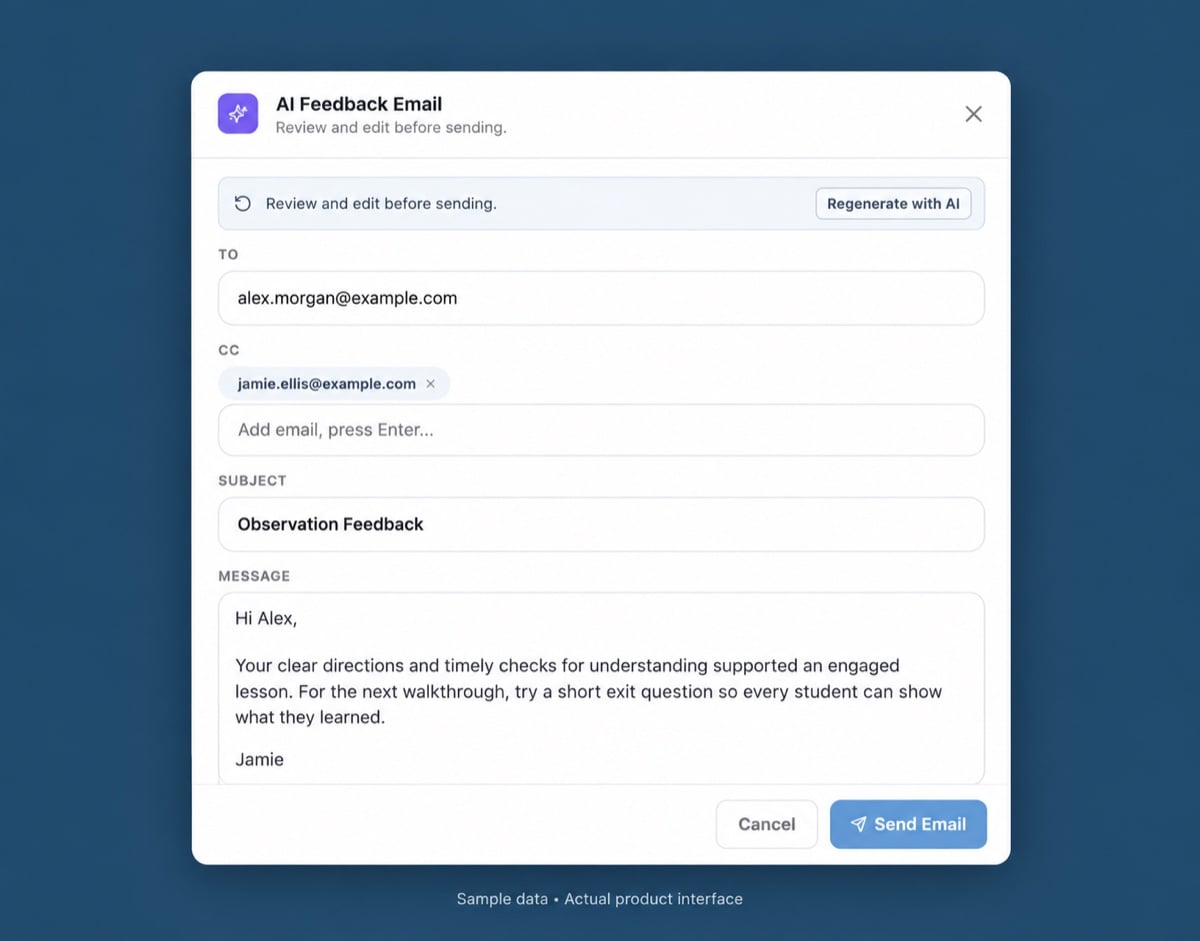
Feedback Flock’s AI-assisted feedback experience, shown with sample data. Available from School Plus; the observer reviews and edits before sharing.
Can we use our existing rubric?
Feedback Flock supports custom forms and scoring. Bring your criteria, evidence prompts, and scoring scale to a demo. Ask to see one real observation so you can assess the form, teacher feedback, and follow-up together.
Which plan includes the AI assistant?
School Plus and District include AI-assisted feedback and AI growth insights. School covers the core observation workflow. Check teacher capacity, observer access, and required features when choosing a plan rather than comparing the lowest advertised price alone.
How should we compare the full cost?
Count teachers, observers, and campuses, then compare the annual bill and included support. Feedback Flock publishes school pricing; district plans are tailored. Speak to a representative to explore any special promotions.
What should we check before switching?
Review the forms and roster you need, the training your team will use, and how existing records should be retained or moved. Historical imports depend on the available files and fields, so agree the approach before making a school-wide change.
Can our team try the workflow first?
Starter, School, and School Plus offer a 40-day trial. Choose a small, suitable observer and teacher group, test your own rubric, and discuss what worked before expanding. Compare Feedback Flock on the devices your team uses each day.
Compare Feedback Flock across the observation cycle
See the observer's starting point
Compare Feedback Flock using the tasks your observers complete each week. The dashboard example shows observation totals, feedback views, and scheduling controls with fictional sample data. Bring your own rubric and ask to follow one observation from the starting screen through evidence collection and feedback. Include a brief walkthrough and a more formal observation if your school uses both. Check the experience on the devices staff carry into classrooms. Browser access on a phone, tablet, or computer means the evaluation can reflect your normal day without requiring an app installation.
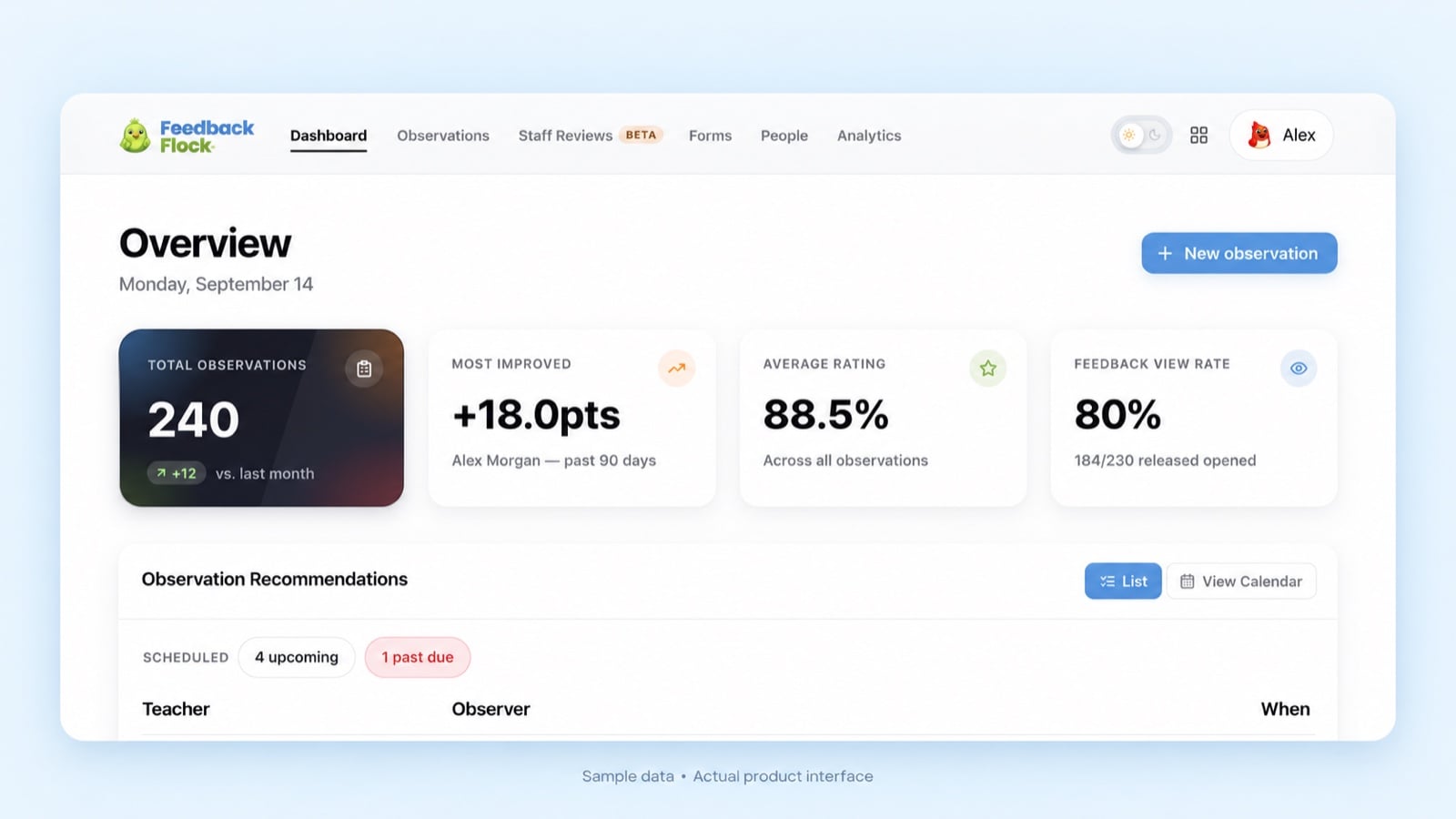
Observer dashboard with fictional sample data.
Follow teacher growth beyond a single visit
As you compare Feedback Flock, include the conversation that follows an observation. Review the teacher's history, self-reflection, goals, and coaching needs alongside the evidence. The chart below shows how observation scores can be viewed over time using fictional sample data. Ask which information would help your leaders decide on the next useful support for a teacher. For school and district needs, bring the reporting questions your leadership team actually asks. This keeps the demonstration focused on professional growth and useful visibility rather than a collection of disconnected screens.
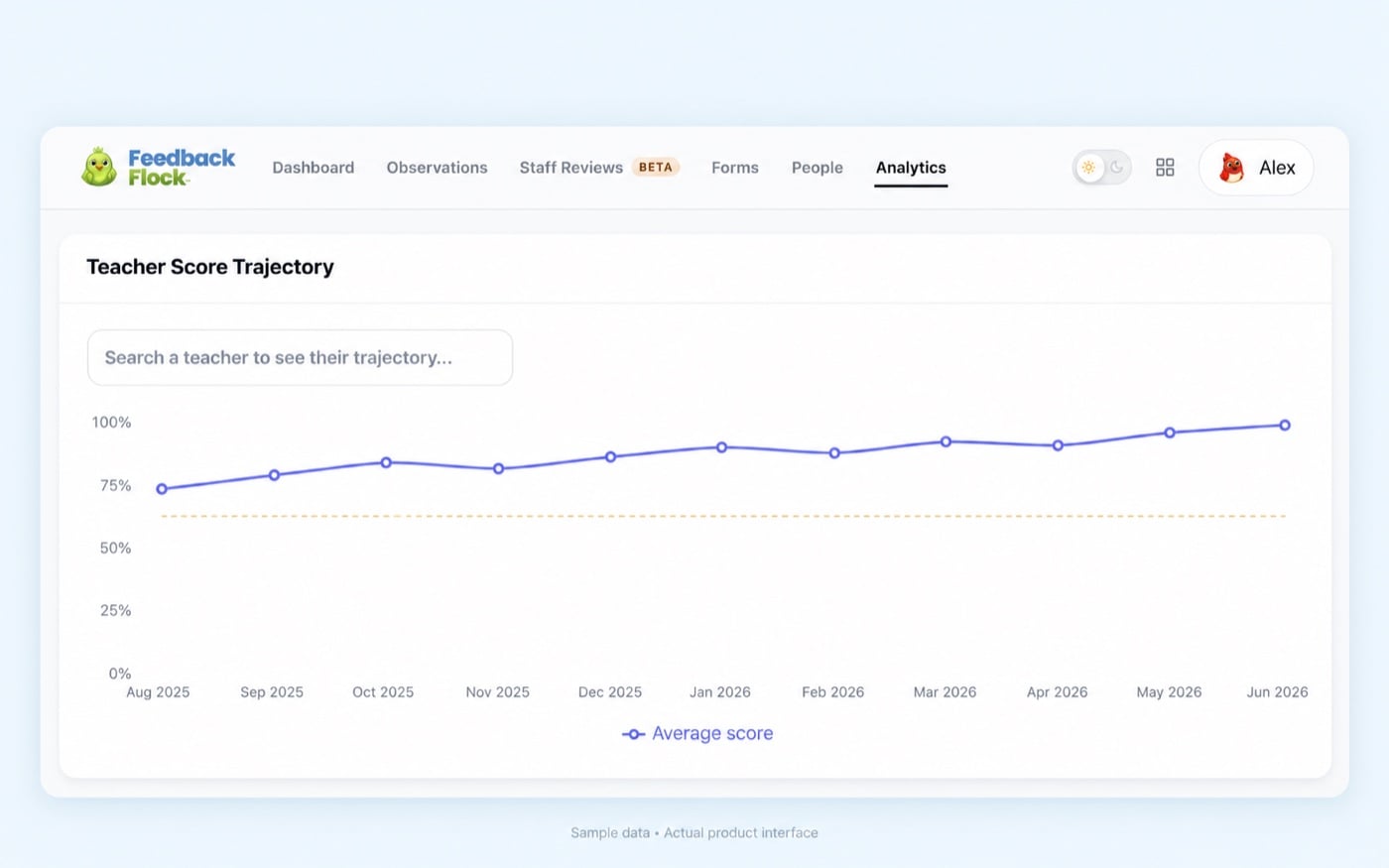
Teacher score trajectory with fictional sample data.
Connect the workflow to your school calendar
To compare Feedback Flock with your current process, bring your observation cycle as well as your rubric. The requirements screen illustrates school-year dates, self-evaluation scheduling, and observation rules. Discuss the routines that apply to new and returning teachers, and agree who will maintain those settings. Review forms, rosters, setup responsibilities, and historical records before introducing the wider staff. Personal support and focused training help connect the product to the way your school works, while a practical pilot gives observers and teachers a chance to identify questions before you expand.
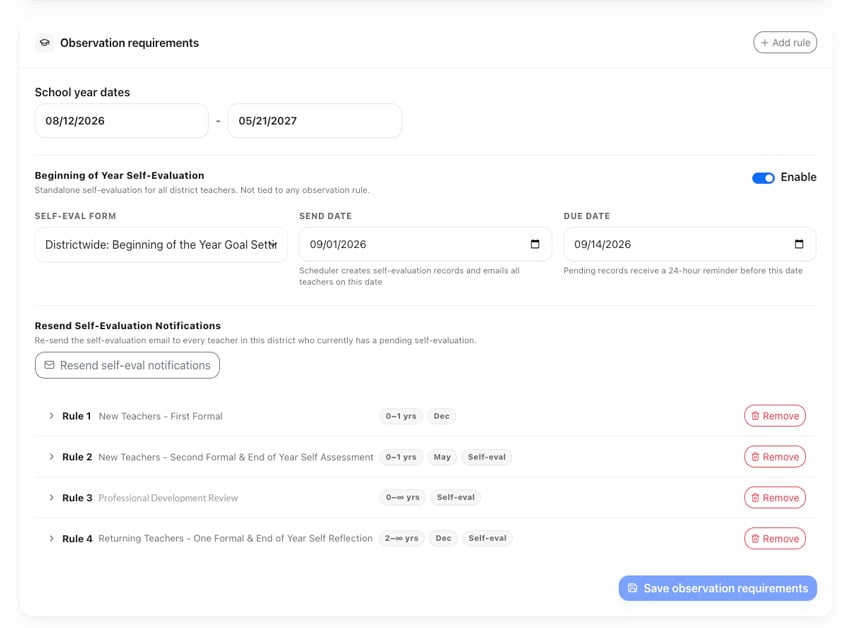
Observation requirements and self-evaluation scheduling, shown with example settings.
Compare Feedback Flock with a complete annual budget and a clear feature list. Count teachers, observers, and campuses, then choose the plan that includes the capabilities you want to test. School Plus includes the AI assistant and AI growth insights. Starter, School, and School Plus include a 40-day trial, followed by annual billing unless cancelled. Ask a representative about any special promotions and confirm the capacity, setup approach, and renewal terms before purchasing. Compare Feedback Flock plans, or bring your remaining questions to the rubric demo.
YOUR RUBRIC IS THE BEST PLACE TO START
See how your school’s process works in Feedback Flock
Bring the rubric you already use. Compare Feedback Flock using an actual observation, see what teachers and leaders see, and explore AI-assisted feedback on School Plus. Ask your questions about setup, training, and switching in the same demo.
Starter, School, and School Plus include a 40-day trial. Feature availability and capacity vary by plan.
These comparisons are written by Feedback Flock to help schools evaluate our platform. Competitor names identify the products being compared; no affiliation or endorsement is implied.