

Free teacher observation capacity planner
Before you schedule observations,check the whole round.
Check that visits, teacher conversations and documentation fit the time you have. Enter your school’s numbers. The planner does the math.
Check your observation plan8 inputs. Immediate results. No signup or meeting required.
- Classroom visit
- Teacher conversation
- Documentation and planning
Enter aggregate counts only. The planner calculates in your browser. It does not submit, store or email your inputs. Use your school’s requirements and exclude unavailable weeks.
Check your observation plan
Use this before scheduling your next round, or when staffing or available time changes. Enter your counts and time estimates below; the planner calculates the totals.
Fictional example: 25 teachers, 1 observation each, 2 observers, 4 usable weeks, 30 classroom + 20 follow-up + 10 administrative minutes per observation, and 2 available hours per observer each week. These are not customer results.
A fictional round, worked through
Want to see the result before entering your own numbers? Select “Try a fictional example” above. The planner fills in the inputs and calculates the gap for you.
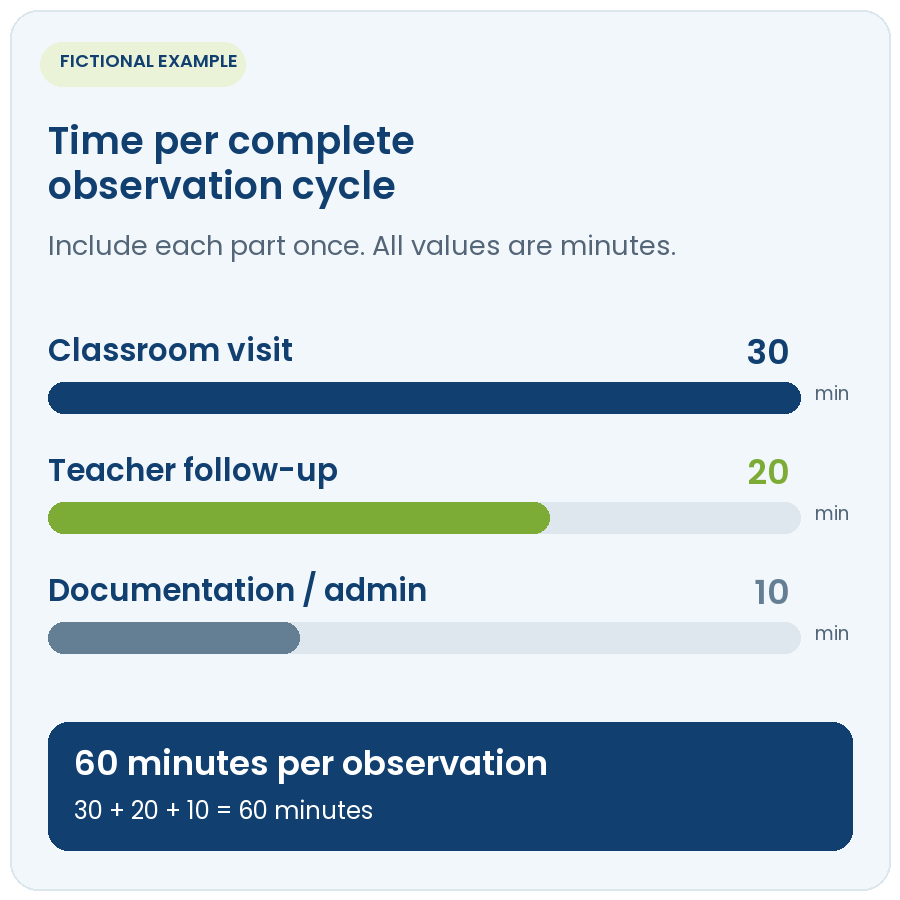
Suppose a school plans one observation for each of 25 teachers. Each cycle includes 30 classroom minutes, 20 minutes for the follow-up conversation and 10 minutes for preparation and documentation. That is 60 minutes per observation, or 25 required hours for the round.
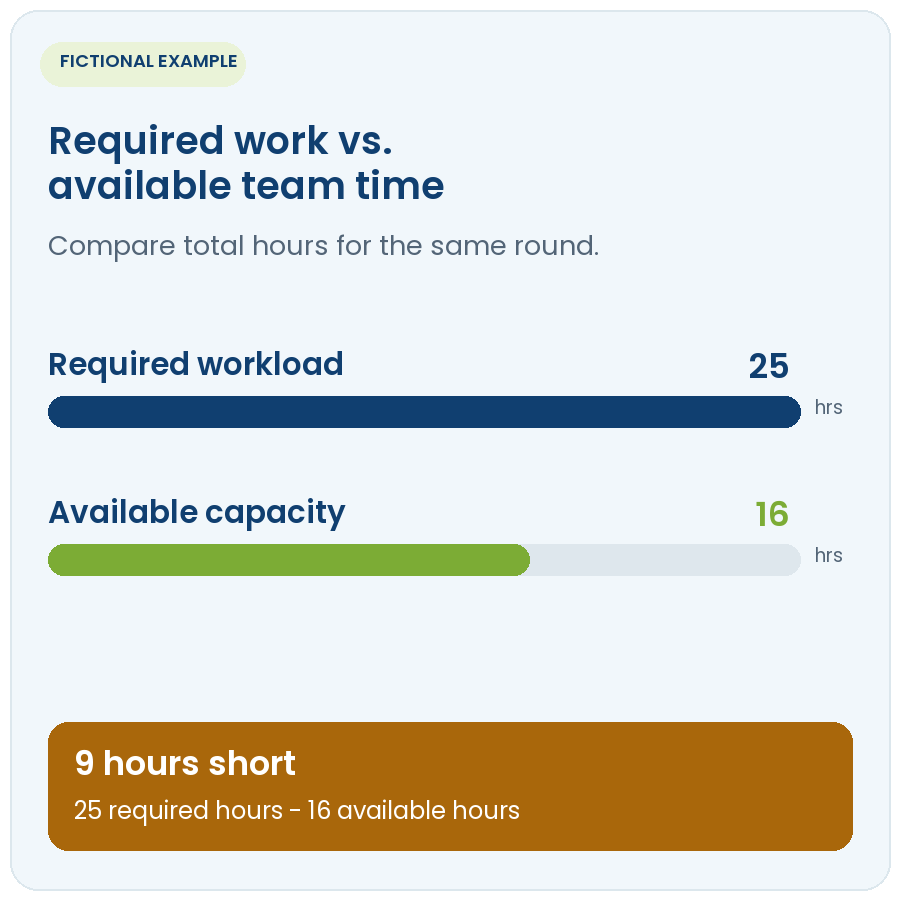
Two observers each protect two hours a week across four usable weeks. Together they have 16 available hours, leaving a nine-hour shortfall. The weekly estimate is 6.25 observations across the team, requiring 3.125 hours per observer each week if the work is shared equally. Displayed results are rounded to one decimal place; the calculation uses unrounded values.
If each observer can instead protect four hours weekly, the team has 32 available hours and a seven-hour surplus. That change is additional protected time, not a software saving. Confirm the hours on real calendars before relying on them. The fictional example button loads these numbers so you can see the calculation, then replace them with your own.
Use your teacher observation capacity planner results
A shortfall means the planned work exceeds the hours available in this period. Consider protecting more observer time, redistributing workload or extending the usable period where school policy permits. Review administrative steps without shortening visits or conversations below your school’s requirements.
A surplus is a planning estimate, not a finished schedule. Check individual timetables, observer availability and time for follow-up before treating the round as covered.
How the calculation works
Observations = teachers × observations per teacher this period.
Required hours = observations × (classroom minutes + teacher follow-up minutes + documentation and administrative minutes) ÷ 60.
Available hours = observers × usable weeks × available hours per observer each week.
Capacity gap = required hours minus available hours. A positive gap is a shortfall; a negative gap is surplus capacity.
Observations per week = total observations ÷ usable weeks. Required hours per observer per week = required hours ÷ (observers × usable weeks). Zero weeks or observers means these weekly ratios cannot be calculated.
The estimate assumes equal observer capacity and one follow-up conversation per observation. It does not claim software creates classroom or coaching time.
Plan the work around each classroom visit
Protecting a place on the calendar for a visit is only part of the work. Teachers also need time to discuss the evidence and decide what to try next. Learning Forward’s Implementation standard describes observation and dialogue as parts of educator feedback. This calculator budgets time for those activities; it does not measure the quality of the conversation.
Connect the round to useful teacher feedback
Before each visit, choose what you want to notice. Use the teacher observation checklist to focus your notes, and distinguish observable evidence from interpretation when preparing the conversation.
If coordinating the workflow is the next challenge, explore Feedback Flock teacher observation software. Review the product and its existing demo or trial flow to decide whether it fits your school.
How to use the teacher observation capacity planner
- Define one round. Count the teachers and required observations for the same period. If requirements differ by group, calculate each group separately before combining the workload.
- Use realistic availability. Exclude holidays, testing, travel and other commitments. Enter protected observation hours, rather than an observer’s entire working week.
- Include the whole cycle. Add classroom time, one follow-up conversation and preparation, scheduling and documentation. Use your school’s expectations instead of treating the fictional example as a recommended visit length.
- Turn the estimate into a schedule. Check each observer’s calendar, allocate visits and protect the conversations. Recalculate if staffing, teacher counts or usable weeks change.
More planning scenarios: calendars, unequal schedules and mixed requirements
Build a calendar you can actually protect
Start with the end of the period and work backward. Set aside the weeks that are genuinely usable, then identify the hours each observer can reserve. A week containing a holiday may still have some availability, but do not count a full week of observation time if the team cannot protect it. Fractional usable weeks are allowed when that is a reasonable way to represent your calendar.
Do not enter the whole workday as available observation time. Leadership meetings, family conversations, student needs and other duties still require attention. Ask each observer for the hours they can protect for this round. When that time is uncertain, compare a conservative version with the intended plan. The result shows the effect of your assumptions; it cannot decide which assumptions are realistic.
When observer availability is uneven
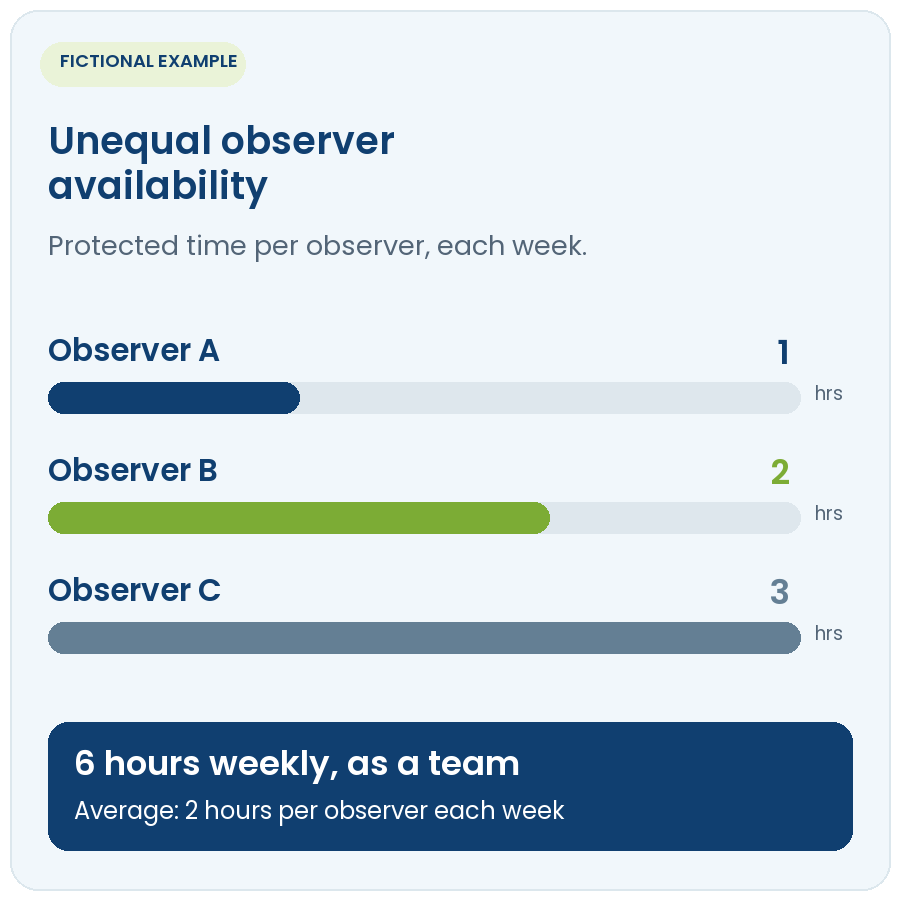
Imagine three observers can protect one, two and three hours a week. Their combined capacity is six hours weekly. Entering three observers and an average of two hours gives the same team total. However, dividing visits equally would overload the person with one hour available. Assign work in proportion to actual availability, then confirm that the required conversations also fit each observer’s calendar.
For a more detailed check, use the teacher observation capacity planner separately for each observer’s assigned teachers. Keep the same period and required visit lengths so the results remain comparable. Do not add the same teacher’s observation to several individual plans unless more than one observer is genuinely expected to attend. Joint visits consume time for everyone attending.
When teachers have different requirements
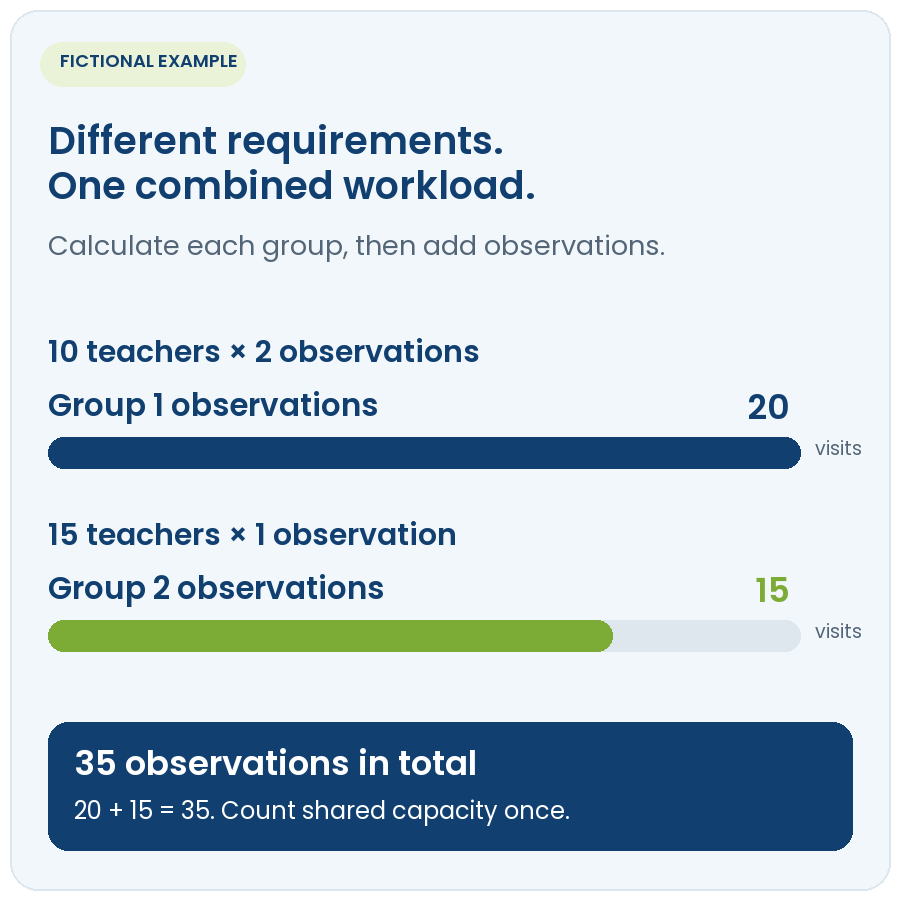
If one group needs two observations and another needs one, use separate calculations for the groups. For example, ten teachers needing two visits create 20 observations; fifteen teachers needing one visit create 15. Together that is 35 observations. At one hour per complete cycle, the required workload is 35 hours. It is not the 25 hours you would get by entering all teachers with one observation each.
Use each group’s actual classroom, conversation and administrative time when the requirements differ. Add the required hours to understand the total workload, but count your team’s available capacity only once. Two groups do not give observers two separate sets of working hours. Allocate the shared time before deciding that both rounds fit.
When the result is a shortfall
Find the constraint before changing the plan. Is the workload larger than expected, is the usable period shorter, or are the protected hours unavailable? Discuss those specific inputs with the team. An additional observer helps only if that person has appropriate responsibility and real time available. Extending the period helps only if deadlines and school policy allow it.
A capacity gap is not a reason to lower the quality of required visits or skip follow-up. Preserve your school’s requirements and decide which scheduling or workload change is feasible. Recalculate the revised plan and check the individual calendars again. The tool does not replace professional judgment about observation frequency, supervision or teacher support.
When the result shows spare hours
Keep room for interruptions rather than immediately filling every remaining hour. A teacher absence, rescheduled lesson or longer conversation can change the timetable. The surplus is the arithmetic difference between your inputs, not a prediction of how the school day will unfold. Review progress during the round and update the remaining workload when assumptions change.
You can record these four items in an existing planning document: the period covered, the required observation count, protected team hours and the person responsible for each next step. This makes the estimate actionable without creating another system to maintain.
Estimate your time with paper, spreadsheets or an existing platform
Start with the workflow your team actually uses
A useful estimate starts with an ordinary observation cycle, not an ideal one. Walk through the work with someone who does it. Separate classroom time, the teacher conversation and the administrative work around them. Use recent examples to identify tasks that are easy to overlook. You do not need to enter a teacher’s name or upload an observation record to do this.
If you do not yet know the administrative time, label it as an assumption in your own planning notes. Compare a lower and a higher estimate rather than treating one guessed number as measured evidence. After the next few completed cycles, revisit the estimate with your team. The calculator will show the effect of a changed input, but it cannot tell you whether that input represents normal practice.
Pen and paper
List the steps after an observer leaves the room. Do notes need to be organized, copied, scanned or delivered to the teacher? Is a separate completion record updated? Include those tasks in administrative minutes when they are part of the process. Keep the teacher conversation in its own field so it is not counted again as paperwork.
Paper may be a deliberate choice that works well for your team. The purpose of the calculation is to understand the time it requires, not to assume that paper is inefficient. If filing happens once for a batch of observations, divide that batch time across the observations it covers. Do not charge the entire batch to every classroom visit.
Spreadsheets
Trace the record from the original notes to the tracker and then to whatever the teacher receives. Include copying information between documents, updating completion dates, preparing the shared view and checking that the appropriate people can access it. Count only tasks your team actually performs. An unused spreadsheet feature is not a time saving.
A shared tracker can make the round visible, but it does not itself protect observer hours. Use the availability field for time the team can reserve on its calendars. Keep existing notes about deadlines, assignments and completed conversations beside the estimate so you can see which part of the plan needs attention.
Existing observation platform
Begin with the work that remains in your current process. Your observers may still prepare the form, review notes, check a draft, release feedback, arrange the conversation or reconcile completion records. Include the relevant administrative tasks without counting classroom or conversation time twice. Do not assume a feature is available or configured simply because a platform can offer it.
If you are comparing processes, run the same teacher count, observation requirements and usable period in both versions. Change only the time inputs you have a reason to change. Keep your school’s required classroom and conversation time intact. This comparison is a planning scenario, not proof that switching software will achieve the difference.
Keep the assumption clear
Record what is included in each time estimate before discussing the result. For example, note whether administrative minutes include preparation, scheduling, documentation and sharing, and whether a conversation is expected for every observation. If additional conversations are required beyond that one-per-observation assumption, budget them separately. The form has one conversation-time input and does not track a separate count of extra meetings.
Agree on who will update the plan when the process changes. A school leader can own the overall period and requirements while observers confirm protected time and actual task durations. Keep that ownership in an existing planning record. The calculator is a way to check the arithmetic together, not a replacement for the people responsible for completing the round.
Teacher observation capacity planner limits and input checks
Keep minutes and hours separate. Classroom, teacher follow-up and administrative fields use minutes per observation. The availability field uses hours per observer per week. Entering 30 in the hours field when you mean 30 minutes would greatly overstate capacity. Thirty minutes is 0.5 hours; ninety minutes is 1.5 hours. Check units before acting on a result that seems unexpectedly comfortable.
Use whole numbers for teachers, observations per teacher and observers. Fractional time is allowed for usable weeks, minutes and weekly hours. Blank, negative or invalid values do not produce a new estimate. Zero available weeks or observers gives zero team capacity, and weekly ratios that require division by zero are marked unavailable. A zero teacher count means no observation workload is included; it does not establish that the school has no observation responsibilities.
The teacher observation capacity planner models complete observation cycles. If classroom visits are already finished but conversations or documentation remain, do not count those visits again as full cycles. Track the remaining activities separately in your existing planning record. Likewise, this estimate does not schedule rooms, match observers with particular subjects or check conflicts with individual teaching timetables.
Results are rounded for readability, while the arithmetic uses the unrounded inputs. Small differences may appear as zero after rounding. When the margin is tight, review the underlying hours rather than assuming a rounded match guarantees enough time. Test a realistic reduction in available hours and compare the result before committing the calendar. When you edit an input, select Calculate my round again to refresh the result. Clear inputs or reload to start a new estimate; no previous version is saved.
Teacher observation capacity planner FAQs
Does this work with paper, spreadsheets or an existing platform?
Yes. The teacher observation capacity planner estimates workload independently of how you record observations. Paper users can include filing and sharing time. Spreadsheet users can include updating trackers. Platform users can include the administrative work that remains. Enter your own measured time; no method is assumed to save a particular number of hours.
What if observers have different amounts of time?
The estimate uses the same weekly availability for each observer. For unequal schedules, run separate calculations for each observer or use the team’s average protected hours as an initial estimate. Then check individual assignments. Enough total hours does not ensure that every observer has a workable timetable.
Does the teacher observation capacity planner create calendar appointments?
No. It estimates team workload and available hours. It does not connect to your calendar or assign teachers to observers. Use the result to agree on a workable plan, then schedule the visits and conversations in your existing system.
Can I save or share my result?
Results stay on this page and are cleared when you reset or reload. Record your aggregate totals in your school’s planning notes if you want to keep them. No email report or saved school record is created. Do not enter teacher or student names.
Back to the teacher observation capacity planner
This planner estimates workload using your inputs. It does not assess teacher performance, school quality or guaranteed time savings.