
For K-12 schools and districts
Teacher Observation & Evaluation Software That Helps Teachers Grow
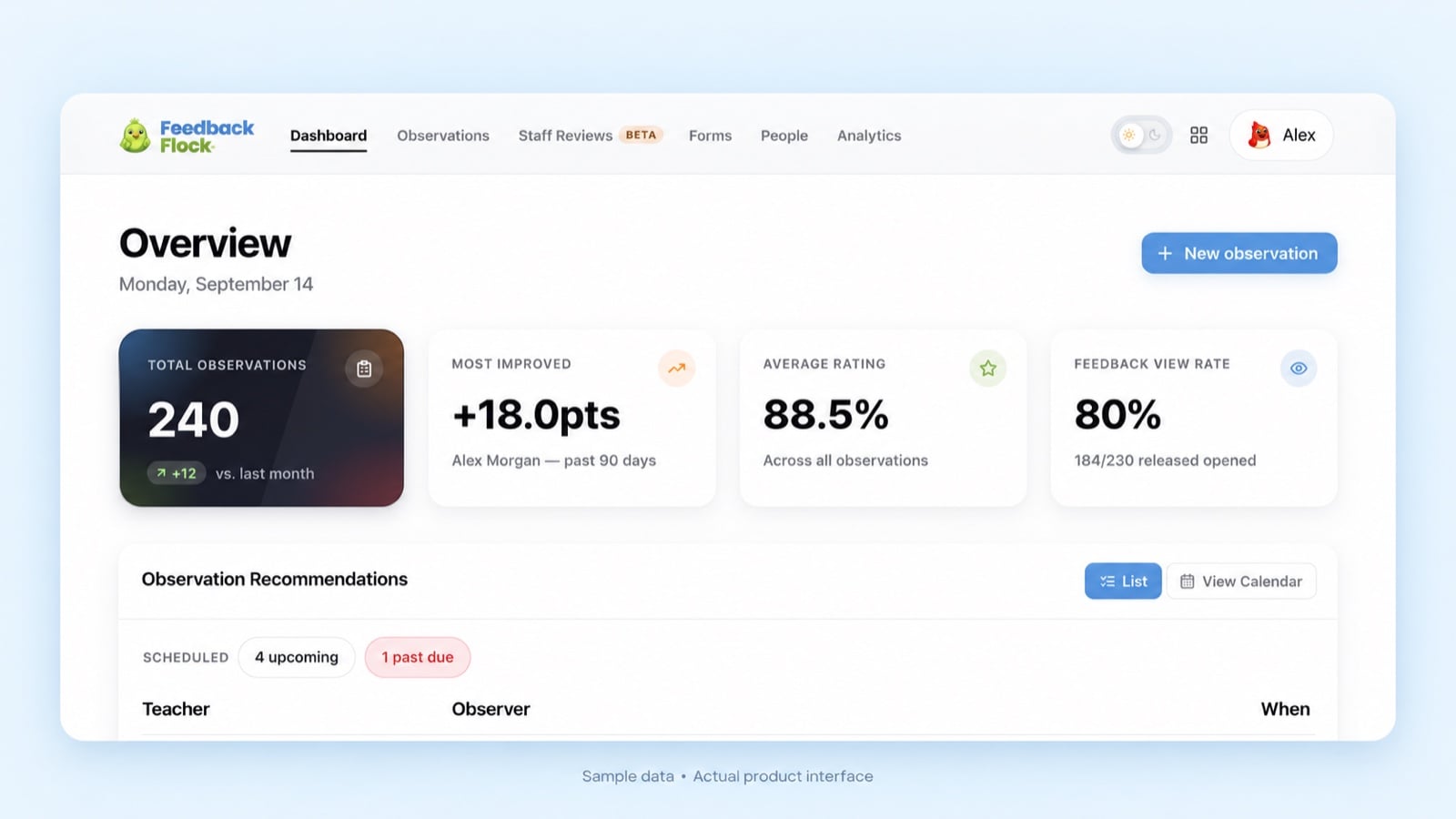
Feedback Flock is teacher observation software for principals, instructional coaches, and district leaders. Run classroom walkthroughs and formal observations in one place, with custom forms, timely feedback, and a clear view of how each teacher is growing.
“Feedback Flock has made such a difference in how we approach observations. It’s easy to use and helps us give teachers more thoughtful, meaningful feedback.”

Sarah Reynolds
Principal, Foundation Academy
Where observations stall
Teacher observation software that keeps everything together
None of this is a people problem. It comes from the tools: when the record, the rubric, and the feedback live in different places, none of them stays reliable. A shared teacher observation platform brings that work together.
Compare: the manual approach
Forms, spreadsheets, and email
Records live across tools no one owns, so they drift.
Where observation records live
A form, a spreadsheet, an inbox
When feedback reaches the teacher
Days later, once notes are typed up
Shared observation structure
Depends on your form and team process
Tracking who is due and who is done
Manual, if at all
Visibility into teacher growth
A folder of PDFs
With Feedback Flock
Feedback Flock
One record, from the walkthrough through to the follow-up.
Where observation records live
One observation record
When feedback reaches the teacher
The same day, from the room
Shared observation structure
A form built around your school's rubric
Tracking who is due and who is done
Visible at a glance
Visibility into teacher growth
A trend per teacher and team
How it works
Classroom walkthrough software, from start to follow-up
Our classroom walkthrough software keeps every step in the same record, so nothing has to be re-typed, re-filed, or chased.
1
Build your observation form
Start from a proven template or write your own rubric field by field. Once it is right, every observer in the school uses the same form.
2
Capture the walkthrough
Score and note evidence on a phone or tablet as the lesson runs, without stepping out of the room to write it up.
3
Prepare and share feedback
Turn the notes into clear, specific feedback and release it to the teacher while the lesson is still fresh.
4
Review growth over time
Each observation adds to the teacher's record, so progress is something you can see rather than something you have to recall.
What's included
Classroom observation software for meaningful feedback
Teacher observation software should support the whole cycle, from the form you build to the trends you take into a leadership meeting. These six capabilities do exactly that. Where a capability depends on your plan, the card says which one.
Custom observation frameworks
Build a form around your school's rubric, or adapt a template. Shared prompts give observers a common structure. Agree as a team on what the criteria mean and what evidence supports each judgment.
Mobile-friendly walkthroughs
Capture notes and scores on a phone or tablet while the lesson is happening, and finish a walkthrough in minutes rather than evenings.
Formal and informal observations
Run quick walkthroughs and full formal observations on the same record, so a teacher's history is one story instead of two unrelated folders.
Scheduling and completion tracking
Set observation cadence by role or experience, and see at a glance who is due, who is overdue, and who is complete.
Teacher observation dashboards
Teachers see observations, scores, and comments in one place, with their history laid out over time. Your teacher observation platform keeps feedback available for the next coaching conversation. Compare dashboards and seat limits on the pricing page.
School and district insights
Roll observations up across teams and campuses to see strengths, gaps, and where coaching should go next. Campus reporting from the School plan; district-wide on the District plan.
Your rubric. Your teachers. Your next step.
Bring your rubric and an observer question
Bring a blank form and a short, permitted sample of evidence. Ask us to show where an observer records the event, how the interpretation stays clear, and what the teacher receives. Tell us which parts of your team's review process need to work together so we can confirm the workflow and plan with you.
Still comparing platforms? See our teacher observation tools rankings for options, editorial ratings, and questions to ask in a demo.
AI-assisted feedback
Turn your observation notes into feedback a teacher can use
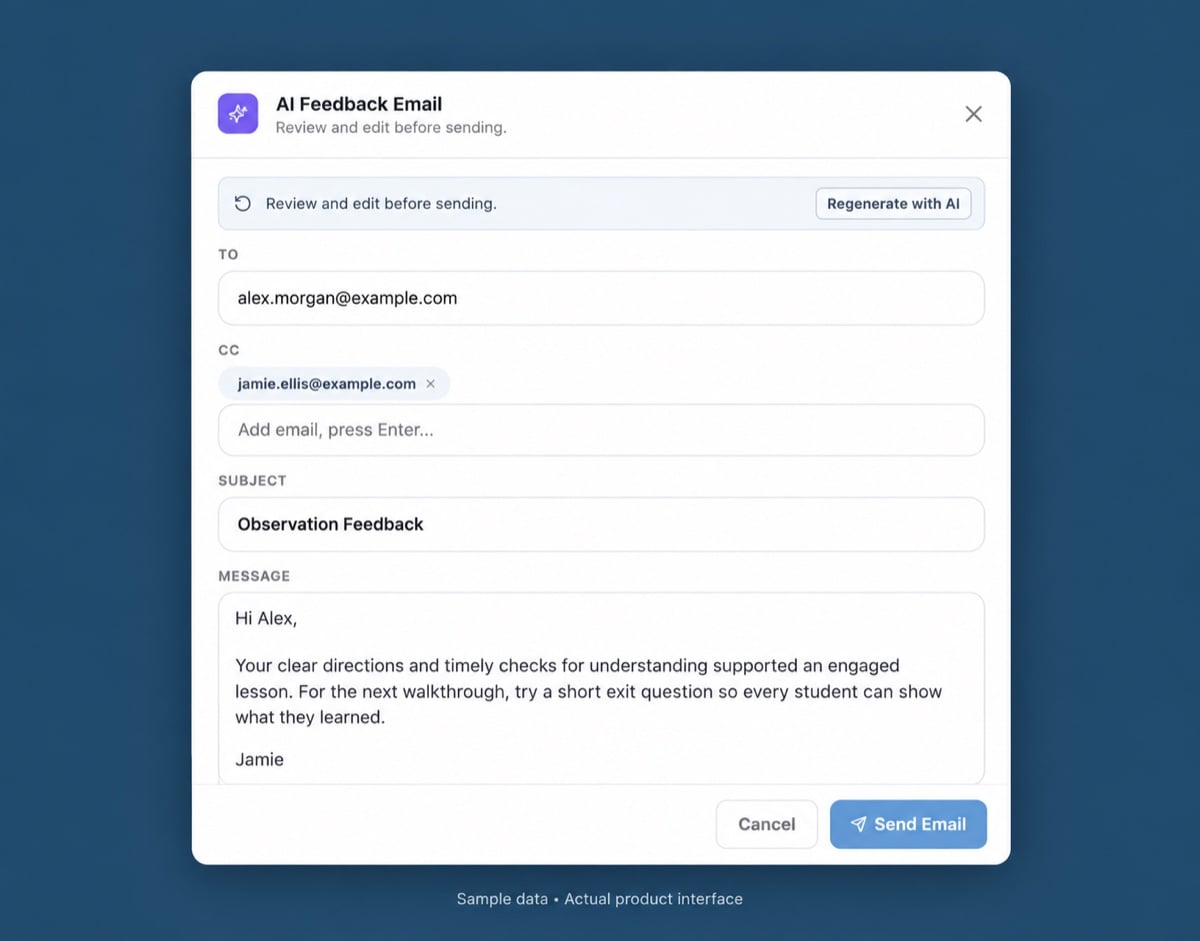
Feedback is drafted from the notes and scores you just captured, so you start from something specific instead of a blank page. You edit it before anything reaches the teacher.
- Drafted from the notes and scores of the observation you just finished
- Editable before it reaches the teacher, so your judgement stays in it
- Included from the School Plus plan onward
Evaluation
Flexible Teacher Evaluation Software
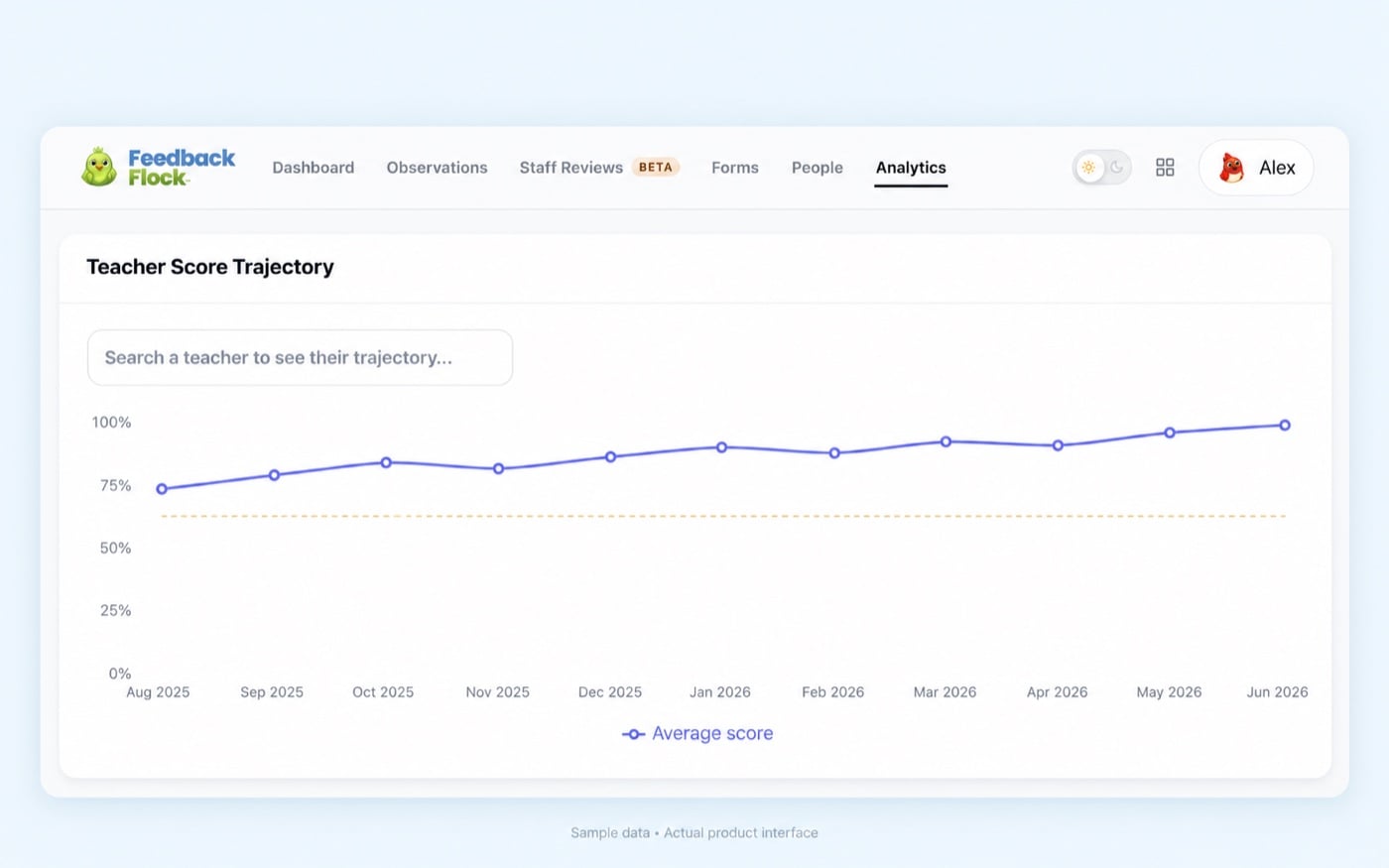
Teacher evaluation software works best when it draws on evidence collected throughout the year. Walkthroughs, teacher self-reflections, and year-end reviews sit in the same record, so your evaluation process reflects what actually happened. Your framework and any state or district requirements stay yours to define.
- Observations and walkthroughs scored against your own rubric
- Teacher self-reflections recorded alongside the observation
- A year-end review assembled from the record, not from recall
What our schools say
Trusted by schools that put teachers first
“Feedback Flock has the best interface I've ever used.”

Christina Haak
Fine Arts Director and Extracurriculars Observer, Foundation Academy
“Our teachers absolutely love Feedback Flock and wish other software was like it.”

Jessica Meade
Principal, Foundation Academy
Teays Valley Christian School
A teacher observation platform built around their process
Teays Valley Christian School wanted an observation platform that could accommodate its existing forms, scheduling rules, and observation deadlines. Feedback Flock helped bring those materials into the platform and worked directly with Principal Mary Mendez as she began conducting observations.
A school's observation process should reflect its own expectations. Teays Valley's early experience shows how Feedback Flock combines flexible forms with personal support to help school leaders get started.
- Existing forms. Teays Valley shared the forms it already used, and the team configured those forms and the school's scheduling rules rather than starting from scratch.
- Personalized setup. Setup ran directly with Principal Mary Mendez as she began conducting observations, and was refined as she put the platform into practice.
- Responsive support. Notes were added to every form item, and the printed report was rebuilt in portrait with teacher and observer signature lines. Later requests for new lesson plan criteria and an Unobservable response option were completed the following morning.
“Feedback Flock has been a huge answer to prayer! Thank you for all of your help and patience with me.”
Mary Mendez
Principal, Teays Valley Christian School
Shared expectations
Help your observers work from shared expectations
A shared form gives your team common prompts. Your team still needs to agree on what the criteria mean, what evidence supports a judgment, and how to handle a visit that leaves something unobserved.
Before a wider rollout, ask observers to review the same permitted sample independently. Compare the evidence behind their interpretations, clarify ambiguous language, and record what needs another look. Use your school's approved training and evaluation process for formal decisions.
Our guide to classroom observation evidence explains how to separate a classroom event from an interpretation. Use it alongside the custom observation form guide when preparing your team's shared prompts.
Questions to bring to your teacher observation software demo
Ask who can create and change the shared form, where an observer records evidence for each criterion, and what happens when a criterion cannot be observed during a visit. Ask to review the completed record from the teacher's perspective, including the evidence, rating language, and follow-up conversation. If your team needs to compare practice observations, explain the exercise you intend to run and ask for a demonstration. Confirm which steps are supported in the platform, which require a separate team process, and which plan fits your needs.
Review a small observation cycle before expanding
Use your teacher observation software trial with a manageable group and a clear purpose for the first cycle. Decide which questions the trial needs to answer, then review the work with both observers and teachers. These checks can help your team identify changes before a wider rollout.
Before the visit: Review the selected form, the meaning of each criterion, and the evidence an observer can reasonably collect in the time available. Decide how the team will handle missing context and practices that are not observed. Confirm who owns questions about the rubric and who can approve changes to it in your teacher observation software. Keep those decisions available to the people conducting visits.
After the feedback is prepared: Read the record as a teacher would. Check whether a rating has supporting evidence, whether the language distinguishes an event from an interpretation, and whether the next conversation is clear. Ask the observer what was difficult to capture. Ask the teacher which parts of the feedback were useful and which needed more context.
Before the next cycle: Record the prompts your team wants to clarify, any access or reporting questions, and the support needed for the rollout. Separate a form-design issue from a training question or a feature you still need demonstrated. Bring the unresolved questions to the Feedback Flock team so you can confirm how the teacher observation software supports your workflow and which plan fits before expanding.
Common questions
What school leaders ask before they switch
These cover the platform as it is sold today. Anything specific to your framework, your state requirements, or your rollout is worth a conversation with us.
Can we build our own rubrics and observation forms?
Yes. Our teacher observation software lets you build a form around your framework, or adapt a template. Before rollout, agree on the criteria, scoring language, and evidence prompts with your team. Use the custom form guide to prepare your shared form, then compare how observers interpret the same permitted evidence. Your school's framework and evaluation requirements govern formal decisions.
Does this work for a single school, or a whole district?
Both. Our teacher observation software supports a single school on the School or School Plus plan. Districts add a district-level dashboard and reporting across schools, expanded roles and viewpoints, and data mapping for imports and exports.
For a district rollout, decide which rubric items should be consistent across campuses and which parts reflect a particular school. Bring your teacher and campus counts, current forms, and reporting needs to a demo so the team can help you compare plans. Compare school and district plans.
What do teachers see?
Teachers get their own dashboard with observations, scores, comments, and their history in one place. Check the pricing page for the dashboards and seat limits included with each plan.
During your trial, review an observation from the teacher's perspective. Is the evidence specific? Is the scoring language clear? Does the feedback identify a useful next step? Teacher evaluation software should support an ongoing conversation about practice, informed by the observation record.
What does getting started involve?
Getting started has four main steps: add your people, set observation requirements, build or choose a form, then conduct the first walkthrough. Classroom walkthrough software keeps those steps connected.
Prepare your teacher and observer lists, current forms, observation schedule, and deadlines. Start with a manageable observation cycle, then review the feedback and resulting record before expanding your rollout. Bring any details you want to preserve to the demo. Read the getting started guide for the setup steps.
How is it priced?
Teacher observation software plans are billed annually: Starter, School, and School Plus, with District quoted for your size. Compare your teacher and observer counts, campuses, and reporting needs against each plan's limits.
The pricing page lists teacher growth dashboards and leadership analytics alongside seat limits. School adds teacher self-evaluations; School Plus includes AI-assisted feedback and AI growth insights. District adds multi-school support and district-level reporting. Use the pricing page for current prices and plan details before choosing. View current pricing and compare the plans.
How does the free trial work?
You get the full platform for 40 days. There are no hidden fees, and you can cancel in under 30 seconds.
Use the trial to run an observation cycle with your own framework: build a form, capture evidence during a classroom visit, prepare feedback, and review the teacher's record. For AI-assisted feedback, read and edit the draft before sharing it. Also check scheduling, completion tracking, and growth insights against the questions your team needs to answer. Book a demo if you would like to walk through your framework first.
Does using the same form make observer ratings consistent?
Using the same form in teacher observation software creates a common structure. It does not establish that observers interpret a criterion in the same way. Compare independent notes from the same permitted sample, discuss the evidence behind each judgment, and revisit unclear criteria. Follow your school's approved rubric and observer training requirements.
In a teacher observation software demo, ask to see the form and evidence fields your observers would use. If your process requires independent practice ratings, side-by-side comparisons, or video review, ask the team to demonstrate that specific workflow and confirm its availability before choosing a plan.
40-day free trial
See it running your own school's rubric
Try our teacher observation software free for 40 days and run a real observation cycle, or book a demo and we will walk through your framework with you. No hidden fees, and you can cancel in under 30 seconds.