

Feedback Flock Teacher Observation Software. -Trio Wordmark 80 heightFeedback Flock Teacher Observation Software. -Trio Wordmark 80 heightFeedback Flock Teacher Observation Software. -Trio Wordmark 80 heightFeedback Flock Teacher Observation Software. -Trio Wordmark 80 height
  • Home
  • Pricing
  • Principal’s Tools
    • Teacher Observation Time Savings Calculator
    • Teacher Observation Cost Savings Calculator
  • Blog
  • Help Center
    • Getting Started Guide
    • Get Support
  • Contact
  • Login
0

$0.00

Start Free Trial
✕

Sign In to Feedback Flock: A User Guide

Published by Feedback Flock Teaching Team
Categories
Tags

How to Sign In To Feedback Flock

A User Guide

Your found out you’ve just upgraded to Feedback Flock for Observations? Congrats, you’re going to love it! First things first, it’s time to get logged in. You should receive an email from Feedback Flock titled “Your [School] account is ready”, be sure to check your spam folder as well. You’ll use the temporary credentials inside the email for your first login. All subsequent logins can be accessed from the ‘Login’ link on the top nav.

Prerequisites: 

  • Your Trial or District should be started. The original Principal and District Administrator accounts are tied to the trial user.
  • Your Principal or Admin should have invited you. Principals and District Administrators can add users individually or import in bulk on the ‘People’ tab. 
Time Requirements:  Set aside 1 minute to get logged in.

Getting Signed In

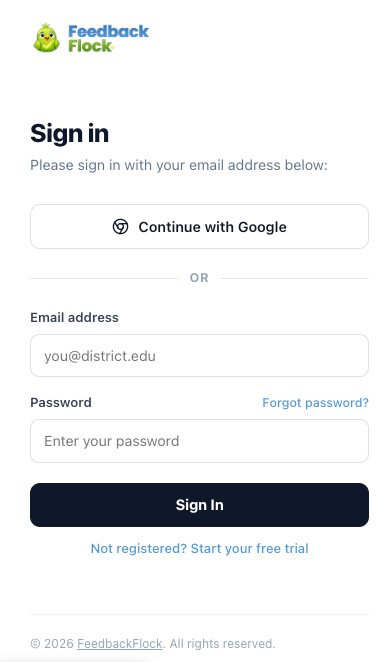
For your first login, follow the link in your email to access the Sign In screen for our Teacher Observation Platform. Enter your email and temporary password supplied from the email, and you’ll be prompt to set a new password. Please set a unique password for your Feedback Flock account.

Using Google for Email? If your school uses a Google Email account, you can make use of Google Single Sign On and opt to login with the ‘Continue with Google’ button in-lieu of your username and password. 

Sign In to Feedback Flock

Can't Sign In?

If you forget your password, please utilize the ‘Forgot Password?’ link on the Sign In page or ask your Principal or District Admin to reset your password.

Need to reset a user’s password?  District Admin and Principals can reset user passwords by searching the user out on the People tab, selecting the user’s name and scrolling to the bottom where a reset password link exists.


Pro Tip: Principals and. District Admin can force 2FA for their users.  Find this in your Settings.

Have a Login Question?

Reach out to our support team. The Feedback Flock team is here to support you, whether you have a best practices question, feature request, or are just wondering how things work.

Next Create Your Observation Forms
Early Bird Worm
Feedback Flock Teacher Observation Software. -Trio Wordmark 80 height

The classroom observation platform designed to help school leaders deliver meaningful feedback, support teacher growth, and simplify the observation process.

Find Your Way

  • Pricing Plans
  • Why Feedback Flock?
  • What is a Teacher Observation Platform?
  • Contact the Flock
  • The Early Bird
    Changelog

The Early Bird

  • teacher observation software
    Teacher Observation Tools: Best Software for Classroom Observations
  • instructional coaching
    The Ultimate Guide to Classroom Observations
  • feedback flock teacher observations
    How to Conduct Effective Teacher Observations That Improve Instruction
© 2026 Feedback Flock LLC • All Rights Reserved • Hosting by Nethers Web Design
    Start Free Trial
    0

    $0.00

      ✕

      Login

      Lost your password?

      ✕

      Cart

      Proceed to checkout View cart
      Feedback Flock - Privacy Notice
      To provide the best experiences, we use technologies like cookies to store and/or access device information. Consenting to these technologies will allow us to process data such as browsing behavior or unique IDs on this site. Not consenting or withdrawing consent, may adversely affect certain features and functions.
      Functional Always active
      The technical storage or access is strictly necessary for the legitimate purpose of enabling the use of a specific service explicitly requested by the subscriber or user, or for the sole purpose of carrying out the transmission of a communication over an electronic communications network.
      Preferences
      The technical storage or access is necessary for the legitimate purpose of storing preferences that are not requested by the subscriber or user.
      Statistics
      The technical storage or access that is used exclusively for statistical purposes. The technical storage or access that is used exclusively for anonymous statistical purposes. Without a subpoena, voluntary compliance on the part of your Internet Service Provider, or additional records from a third party, information stored or retrieved for this purpose alone cannot usually be used to identify you.
      Marketing
      The technical storage or access is required to create user profiles to send advertising, or to track the user on a website or across several websites for similar marketing purposes.
      • Manage options
      • Manage services
      • Manage {vendor_count} vendors
      • Read more about these purposes
      View preferences
      • {title}
      • {title}
      • {title}