
FOR PRINCIPALS COMPARING CLASSROOM MOSAIC
A Classroom Mosaic Alternative with an AI Assistant for Principals
Give teachers immediate feedback and give principals help preparing it. Feedback Flock combines custom observations, teacher history, and an AI assistant on School Plus and above. Work on any device through your browser—no app required.
Bring your current rubric. See how your notes become an editable feedback draft, and explore the teacher and leadership views.
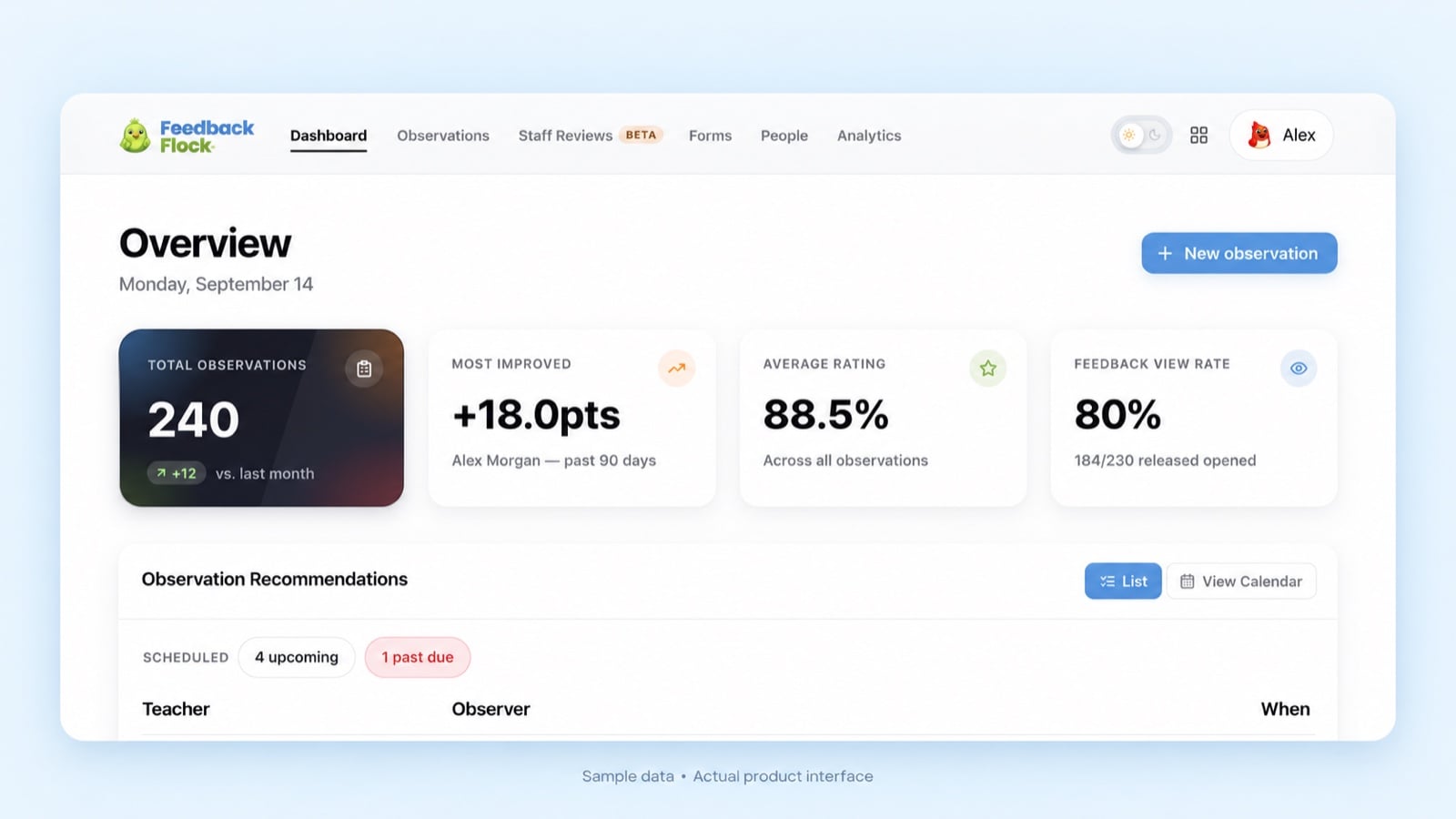
Inside Feedback Flock: observation totals, feedback views, and scheduling controls. Screenshot uses sample data.
LESS DRAFTING WORK. MORE USEFUL FOLLOW-UP.
See how Feedback Flock supports the principal’s work
Both Feedback Flock and Classroom Mosaic provide immediate teacher feedback. Feedback Flock’s AI assistant helps with the preparation: start from your observation notes and scores, review the draft, and apply your professional judgment before sharing.
01 / YOUR NOTES AND SCORES → AN EDITABLE DRAFT
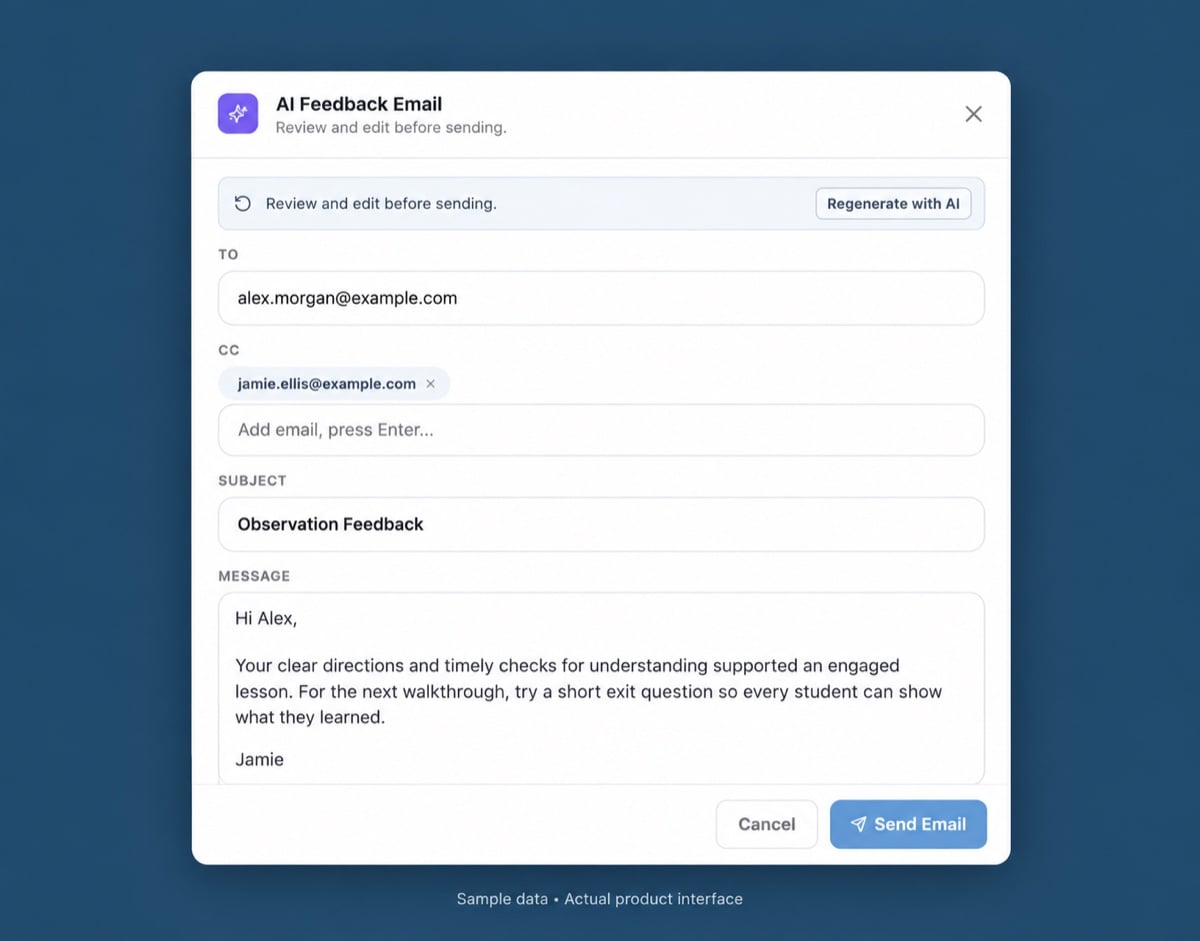
An AI assistant that starts with your evidence
Use an AI-assisted draft to prepare specific feedback, then review and edit it before the teacher receives it. Included from School Plus; your judgment stays in the process.
Sample-data screen of the feedback drafting experience.
02 / KEEP THE NEXT CONVERSATION CONNECTED
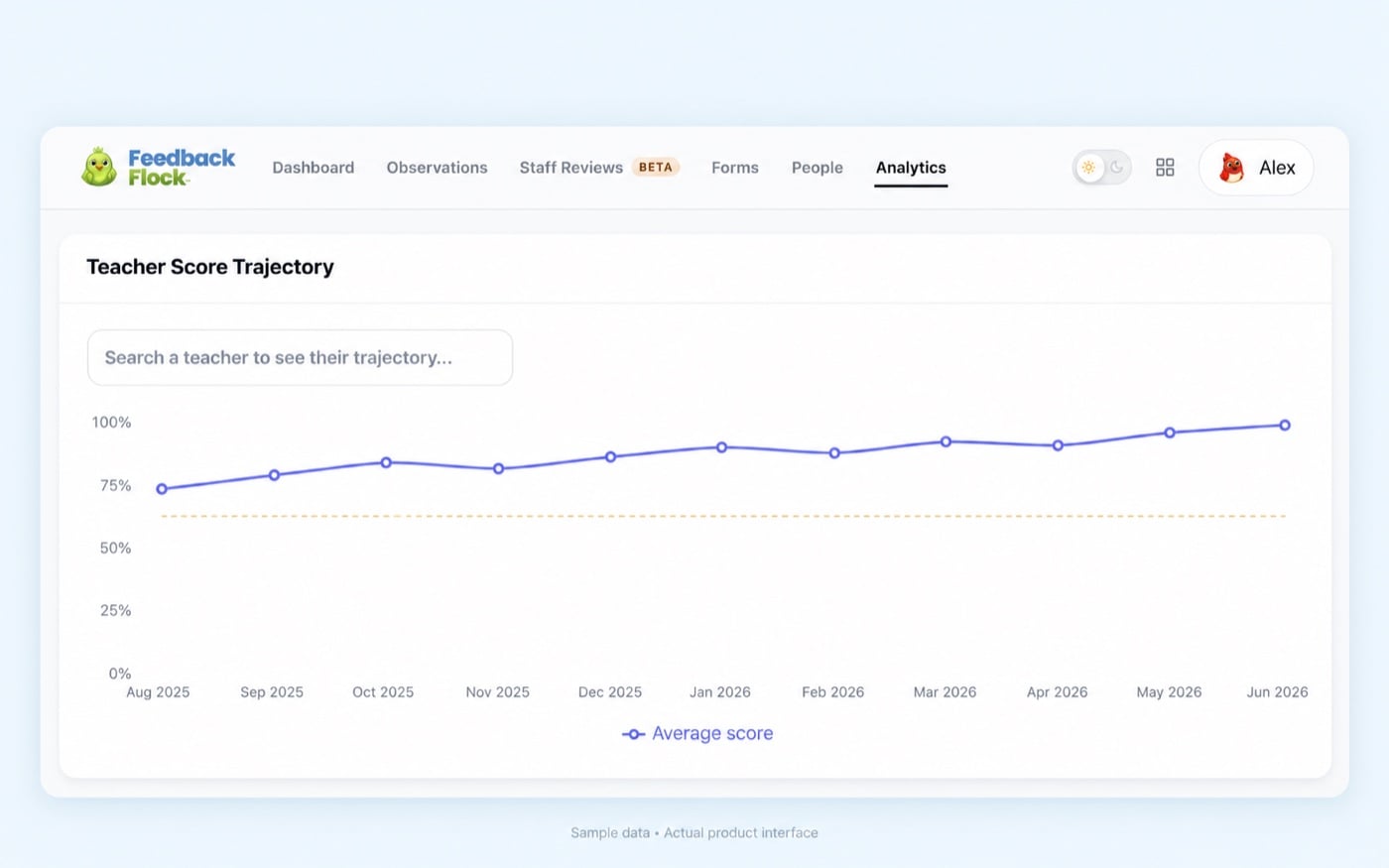
Immediate feedback with a history to return to
Teachers can revisit feedback and observation history. Principals can use scores over time, goals, and reflection to focus the next coaching conversation.
Chart shown with fictional sample data.
PROOF FROM SCHOOLS USING FEEDBACK FLOCK
An approachable experience, with people behind it
“Feedback Flock has made such a difference in how we approach observations. It’s easy to use and helps us give teachers more thoughtful, meaningful feedback.”
Sarah Reynolds
Principal, Foundation Academy
Teays Valley brought its existing process
Teays Valley Christian School shared its existing observation forms. Feedback Flock configured those forms and the school’s scheduling rules, then refined the setup as Principal Mary Mendez began conducting observations.
Later requests for new lesson plan criteria and an Unobservable response option were completed the following morning.
“Feedback Flock has been a huge answer to prayer! Thank you for all of your help and patience with me.”
Mary Mendez
Principal, Teays Valley Christian School
Read the published school experience.
CLASSROOM MOSAIC VS. FEEDBACK FLOCK
What you gain with Feedback Flock
Keep immediate teacher feedback and custom observations. Add an AI assistant for principals, easy browser access, and personal help putting your school’s process to work. The comparison below shows published capabilities and plan details.
Forms, walkthroughs, and device access
FEEDBACK FLOCK
Custom forms and scoring for formal and informal observations. Works on any device through your web browser—no app required.
CLASSROOM MOSAIC
Custom forms and a form library, with website access plus iOS and Android apps.
Preparing and sharing teacher feedback
FEEDBACK FLOCK
Immediate teacher feedback. From School Plus, an AI assistant drafts from notes and scores for the principal to review and edit before sharing.
CLASSROOM MOSAIC
Immediate emailed feedback and dialogue threads for follow-up conversations.
Teacher history and leadership insights
FEEDBACK FLOCK
Teacher dashboards and observation history, school analytics, and multi-school oversight on the District plan.
CLASSROOM MOSAIC
Observation tracking, teacher reporting, and instructional-practice trends.
School plans and capacity
FEEDBACK FLOCK
School: $1,380 annually, 70 teacher seats, unlimited observers. School Plus: $2,820 annually, 140 teacher seats, unlimited observers, and AI-assisted feedback.
CLASSROOM MOSAIC
School: $1,500 annually, 75 teachers, unlimited observers. School Premium: $3,000 annually, with onboarding and dedicated support roles.
Trying the platform
FEEDBACK FLOCK
40-day trial on Starter, School, and School Plus. Choose School Plus to explore the AI assistant.
CLASSROOM MOSAIC
45-day trial.
ALREADY USING CLASSROOM MOSAIC?
Keep your rubric. Get help planning the switch.
Start with your current observation process, teacher count, and renewal timing. See Feedback Flock with your own rubric before planning a wider rollout.
Can we keep our existing rubric?
Yes. Feedback Flock supports custom forms and scoring. Bring your rubric, evidence prompts, and scoring scale so we can show how your process will work in the platform.
What happens to historical Classroom Mosaic observations?
Classroom Mosaic lists PDF and Excel exports. Bring sample exports so we can review what is available and agree how your records should be retained or moved. Import compatibility depends on the files and fields; we’ll confirm the approach before you switch.
Who prepares the forms and roster?
Bring your current forms and teacher roster. Our team will walk through the setup with you and agree what you will provide and what we will configure. The Teays Valley example above shows how that support has worked for one school.
How much training will our team need?
Your observers can open Feedback Flock in a browser on a phone, tablet, or computer without installing an app. Training focuses on your real workflow: capturing evidence, reviewing feedback, and using the teacher and leadership views.
Can we pilot before a school-wide switch?
Starter, School, and School Plus include a 40-day trial. Test your rubric with a suitable group of teachers and observers. Choose School Plus if you want to evaluate the AI assistant, and review the experience before expanding.
Evaluate a Classroom Mosaic alternative with a practical pilot
Compare the work after immediate feedback arrives
Teachers can receive immediate feedback in both products, so speed alone is not the reason to choose a Classroom Mosaic alternative. Look at what a principal needs to do to make that feedback useful. Ask an observer to capture meaningful evidence, explain the scores, and prepare a clear next step. Then review the result as a teacher would. Feedback Flock's connected observation and teacher growth workflow is designed to support that conversation, with the AI assistant on School Plus helping principals turn their notes and scores into a draft they can review.
Use a real instructional focus for the example, such as checking for understanding or student participation. Review whether the feedback describes what the observer saw and gives the teacher a useful direction for practice. Ask the teacher how they would prepare for the next conversation. Include self-reflection and a growth goal in the demonstration so the evaluation goes beyond the notification that an observation was completed. This makes the comparison about the quality of the support and how easily people can continue it during the school day.
Give the principal's AI assistant a realistic task
If AI assistance is why you are exploring a Classroom Mosaic alternative, evaluate the School Plus plan. Start with the rubric your school already uses and notes that contain enough detail to explain the observation. Review the AI-assisted draft against the evidence before sharing it. Check tone, accuracy, and the usefulness of the suggested direction. The principal remains responsible for the message. A demonstration using your own criteria can help your team judge whether the assistant fits its expectations for professional feedback.
Discuss where draft assistance would be most useful in your current routine. A principal may have good notes but need help turning them into a thoughtful narrative after several classroom visits. A coaching lead may want to compare how feedback connects to the rubric and the next growth conversation. Try those examples rather than expecting a generic sample to answer every question. Agree how observers will review and edit drafts, and keep the distinction between the core School workflow and the AI features on School Plus clear throughout the pilot.
Try the browser experience on everyday devices
A Classroom Mosaic alternative should fit the devices teachers and leaders already use. Feedback Flock works through a browser on a phone, tablet, or computer without requiring an app. Test the complete routine on those devices: opening a form, capturing evidence, reviewing scores, reading feedback, and returning to the teacher's growth history. Ask participants where they hesitate or need clarification. The most useful feedback comes from people completing a real task, especially observers who will be using the system between classroom visits.
Keep training focused on your school's actual process. Use the form staff recognize and show the teacher view alongside the observer view so people understand how their work connects. Practice one completed observation and a follow-up conversation before covering less frequent settings. Personal setup support can help your school prepare the forms and roster, while the pilot shows which instructions staff need most. An intuitive product still benefits from a clear introduction, and the introduction should support practical use rather than become a separate professional development project.
Plan for records, rubrics, and leadership needs
When evaluating a Classroom Mosaic alternative, inventory the information you need to keep before deciding how to switch. Identify required observation dates, teacher identities, scoring scales, rubric versions, notes, and attachments. Review available exports and bring sample files to our team. Agree which records should be retained in their current format and which may be suitable for an import. Do not make the purchase depend on an assumed automatic migration. A clear records plan helps your school move forward while maintaining access to its earlier work.
Write down the leadership questions you need the platform to answer. School and district analytics and visibility into teacher support are part of Feedback Flock's capabilities. Ask to see how your leaders would review a teacher's history and the relevant school or district view. For multiple campuses, discuss the District plan and the reporting your team needs. Clarify roles and responsibilities before the pilot, including who maintains forms, who keeps the roster current, and who helps observers when a question arises during the first observations.
Decide what success looks like before the trial
Start the 40-day trial with a suitable group of teachers and observers, a familiar rubric, and a small set of success criteria. Ask whether observers can complete the workflow comfortably, whether teachers understand the feedback, and whether leaders can use the information to guide support. Include a completed observation and a teacher conversation in the review. If you want to evaluate the AI assistant, choose School Plus so the trial includes the experience you intend to buy. Use what the group learns to shape the next step.
Compare the full annual cost against the number of teachers and observers you need. Starter includes one observer and 15 teacher seats. School includes unlimited observers and 70 teacher seats. School Plus includes unlimited observers, 140 teacher seats, AI-assisted feedback, and AI growth insights. District pricing is tailored. Monthly equivalents shown on this page are based on annual prices; trials move into annual billing unless cancelled. Speak to a representative about any special promotions, and confirm the features and capacity that apply to the plan your school is considering.
Turn the feature comparison into a school-ready decision
Be specific about the work you want the AI assistant to improve. In a Classroom Mosaic alternative evaluation, do not treat immediate teacher feedback and principal writing support as the same benefit. Both products can deliver feedback promptly; Feedback Flock's School Plus assistant helps the observer prepare a draft from notes and scores for review. Try that task after a realistic classroom visit, then discuss whether the draft gives the principal a useful starting point. Keep the standard focused on accurate, thoughtful communication that supports a teacher's next step.
Ask teachers what they need to understand when an observation arrives. Can they connect the feedback to the evidence, prepare a reflection, and discuss a goal with their coach or principal? Use those questions to review the complete teacher experience. A Classroom Mosaic alternative should support a constructive relationship between the observer and the teacher, not simply make the administrative record easier to file. Give staff a chance to describe the experience in their own words and use that feedback when deciding whether the pilot is ready to expand.
Review the requirements screen below alongside your school calendar. Feedback Flock shows school-year dates, self-evaluation scheduling, and observation rules in one example of the setup experience. Bring the requirements you actually use and discuss how they should be configured. If new and returning teachers follow different cycles, include both examples in the conversation. Agree who will keep those settings current and how observers will learn the routine. This turns an abstract feature comparison into a practical discussion about the work your school needs to complete across the year.
Your final recommendation should connect the product experience to the plan you intend to purchase. Summarize the teacher count, observer access, AI needs, annual cost, setup responsibilities, and unresolved questions. Bring that summary to a representative and ask to see any part of the workflow that remains unclear. Choose Feedback Flock because its browser access, principal's AI assistant, connected teacher growth tools, and personal support fit your team's needs. Use the rubric demo and trial to see that fit for yourself before making a wider commitment.
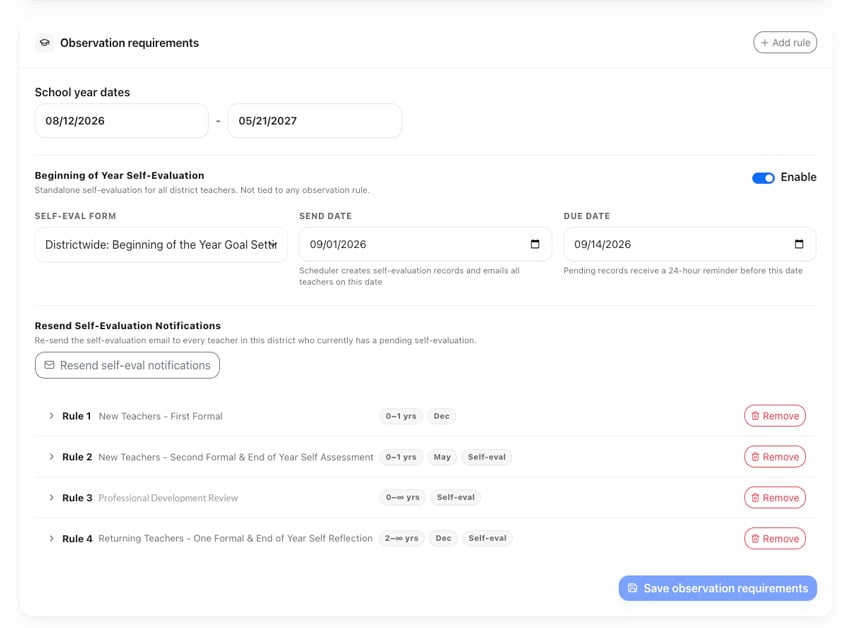
Feedback Flock observation requirements: school-year dates, self-evaluation scheduling, and observation rules. Example settings are shown.
Use the final demo to put the whole experience together. Bring an observer who completes visits, a teacher who receives feedback, and a leader who reviews support across the school. Work through one familiar rubric and ask each person to describe what they would do next. Include the AI draft review if School Plus is the plan under consideration. Note any remaining question about forms, access, historical records, or the annual agreement, and resolve it with our team before expanding. Your school's decision should rest on a clear working example of Feedback Flock supporting the process your staff already understands.
SEE THE PRICE OF THE FEATURES YOU WANT
Choose the plan that includes your principal’s AI assistant
School Plus includes AI-assisted feedback and AI growth insights. School covers the core observation workflow without those AI features. Compare the annual cost, teacher capacity, and observer access below.
STARTER
$420 / year
Equivalent to $35 per month
1 observer · 15 teacher seats
Unlimited observations and forms, a teacher growth dashboard, and leadership analytics.
Explore StarterSCHOOL
$1,380 / year
Equivalent to $115 per month
Unlimited observers · 70 teacher seats
Unlimited observations and forms, teacher growth dashboards, self-evaluations, and leadership analytics.
Explore SchoolSCHOOL PLUS · INCLUDES THE AI ASSISTANT
$2,820 / year
Equivalent to $235 per month
Unlimited observers · 140 teacher seats
AI-assisted feedback and AI growth insights, plus teacher dashboards, self-evaluations, leadership analytics, and priority support.
Explore School PlusStarter, School, and School Plus include a 40-day trial, then are billed annually and renew unless cancelled. Monthly figures shown are annual-price equivalents.
Speak to a representative to explore any special promotions.
Supporting several schools?
District plans offer multi-school oversight, district reporting, expanded roles, and support matched to your organization. Pricing is tailored to your needs.
Talk Through Your DistrictYOUR RUBRIC. YOUR EVIDENCE. YOUR NEXT STEP.
See your rubric and the AI assistant in Feedback Flock
Bring the form you use today. We’ll show how observations work in your browser, how principals review an AI-assisted feedback draft, and what teachers see. Ask about your roster, training, and existing records in the same conversation.
Comparing platforms or approaching renewal? Bring your teacher count and the features you need so we can help you choose a suitable plan.
Written by Feedback Flock. Classroom Mosaic information is based on its published product materials. Feature availability varies by plan. Product screenshots use sample data.
Classroom Mosaic capabilities · Classroom Mosaic pricing · Feedback Flock features and customer stories · Current Feedback Flock pricing
Pricing and product details reviewed November 5, 2026. Vendor names identify the products compared; no affiliation or endorsement is implied.
Still considering your options? Compare Feedback Flock with other teacher observation platforms.